Report AI assistant traffic in Google Analytics 4
GA4 now groups many visits from ChatGPT, Gemini and Copilot into an AI Assistant channel, but some still arrive as direct traffic and few UAE businesses connect any of it to enquiries. We set up GA4 to separate that traffic, follow it through to WhatsApp taps and form fills, and report it monthly.
How do I see ChatGPT and other AI traffic in Google Analytics?
GA4 now has a default AI Assistant channel: Google’s help documentation says it covers visits from sources such as ChatGPT, Gemini, Deepseek, Copilot and Grok, matched by referrer. Clicks from Google AI Overviews and AI Mode are not in it; Google counts them as Organic Search. Some assistant apps strip the referrer, so part of AI traffic still lands in direct, which is why a checked channel set-up and landing-page view are still worth having.
Report AI traffic in GA4 is one part of AI search optimisation, which we run alongside SEO Dubai so the same pages rank and get cited.
What report AI traffic in GA4 in Dubai includes
AI Assistant channel, checked and extended
We confirm GA4’s default AI Assistant channel is catching your assistant visits, and add a custom channel group for any sources it misses.
Landing page and conversion view
Which pages AI visitors land on and whether they call, tap WhatsApp, submit a form or book, with key events configured.
Search Console AI Overview signals
Query-level impressions and clicks for pages appearing in AI Overviews, reported next to GA4 data since GA4 cannot separate them.
Server log cross-check
AI crawler fetches in your logs compared with GA4 referrals, so you can distinguish crawling from human visits.
Monthly AI traffic report
Sessions, landing pages and enquiries from each assistant, alongside prompt-share figures so visibility and traffic are read together.
Prompts and queries we optimise for
How buyers search for this
How GA4 reports traffic from AI assistants
Google Analytics 4 now has an AI Assistant channel in its default channel group. Google's help documentation says it covers users who arrive from sources like ChatGPT, Gemini, Deepseek, Copilot or Grok, assigned when the referrer matches Google's list of AI assistants, and that it excludes Google's AI Overviews and AI Mode, which are counted as Organic Search. That leaves blind spots. AI Overviews and AI Mode clicks sit inside organic traffic, and Search Console reports them within the Web search type rather than separately. Some assistant visits can also arrive without a referrer, for example from apps or copied links, and land in Direct. A sound setup uses the AI Assistant channel, a custom channel group for sources it misses, and enquiry tracking for forms, calls and WhatsApp clicks.
- GA4 lets you create custom channel groups with your own rules; the default channel group itself cannot be edited.
- Bing Webmaster Tools' AI Performance report shows Copilot citations but not clicks, so it complements GA4 rather than replacing it.
- Pew Research found users clicked a link inside Google's AI summaries on only about 1% of visits, so traffic understates AI visibility.
What keeps report AI traffic in GA4 off page one
Relying on the default channel alone
The AI Assistant channel only catches visits whose referrer matches Google's list, so newer assistants can be missed. Build a custom channel group with a source rule for known AI domains, place it above Referral, and review the list of sources every few months.
Not tracking what AI visitors do
A sessions count says little about value. Mark form submissions, phone clicks and WhatsApp clicks as key events, so you can compare enquiry rates from AI assistants with organic search and paid traffic. That comparison is the number that matters to the business.
Reading AI Overviews as lost traffic
Because AI Overviews and AI Mode are counted as Organic Search, a fall in organic clicks can reflect answers that satisfied the searcher on the page. Look at Search Console impressions alongside clicks, and at branded search and enquiries, before concluding that visibility has dropped.
What competitors are not measuring
Plenty of businesses still judge AI search by anecdote, a screenshot from a colleague or a sudden change in organic traffic, with no reliable view of what assistants send them. GA4's AI Assistant channel and Bing's AI Performance report have made basic measurement easier, but they only help if someone configures and reads them. A business that tracks AI referrals, the enquiries those visits produce and its citation counts each month can see which pages and assistants deserve more investment, and can defend that budget with evidence. Competitors without that view are left guessing whether their AI visibility work is doing anything at all.

How we deliver report AI traffic in GA4: three steps, no black box
Configure
We build the channel group, check key events and connect Search Console to GA4.
Validate
Test visits from each assistant confirm the rules match and conversions are recorded.
Report
AI traffic and enquiries are reported monthly next to your prompt-share figures.
Report AI traffic in GA4: questions UAE businesses ask
Answered in the first sentence, so AI assistants can quote us directly.
Three reasons. Many assistant answers do not lead to a click at all, because the user gets what they need in the answer. Some apps, particularly on mobile, strip the referrer so the visit lands in direct. And AI Overview clicks are counted as ordinary Google organic. The GA4 figure is therefore a floor, which is why we report it alongside prompt-share and Search Console data.
Yes, if the WhatsApp button fires a GA4 key event on click. The click is attributed to the session's source, so an enquiry that started from a ChatGPT citation is recorded against the AI channel. It stops at the click; what happens inside WhatsApp is not tracked. Adding a source tag to the pre-filled message text lets your team see the origin in the chat itself.
No. Crawlers such as GPTBot and PerplexityBot do not run JavaScript, so they do not appear in GA4, and they are not customers. They belong in server log analysis, where they tell you which pages assistants fetch and how often. We report the two separately: crawler activity as a sign of retrieval, GA4 referrals as a sign of humans arriving.
We check your site against your three closest Dubai competitors and send the gaps costing you leads to your WhatsApp within 48 hours. Free, no call required.
The Google data behind the claims
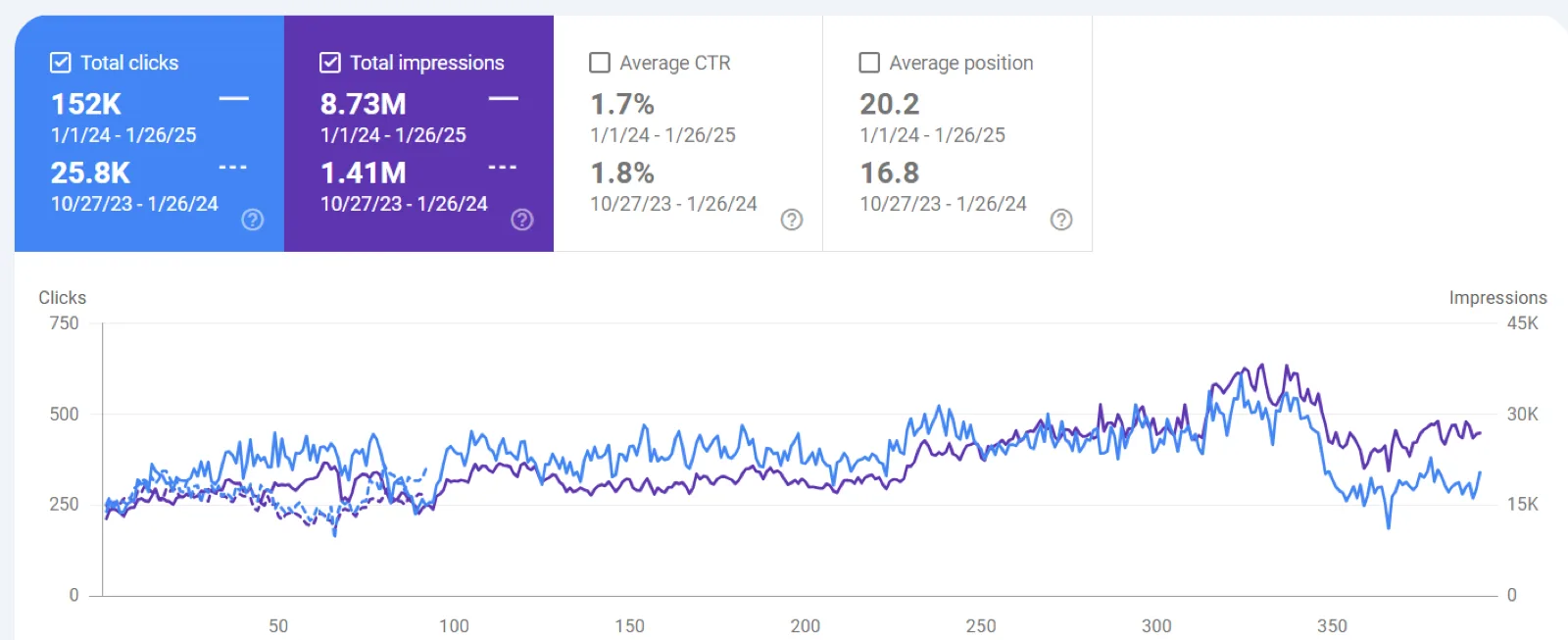
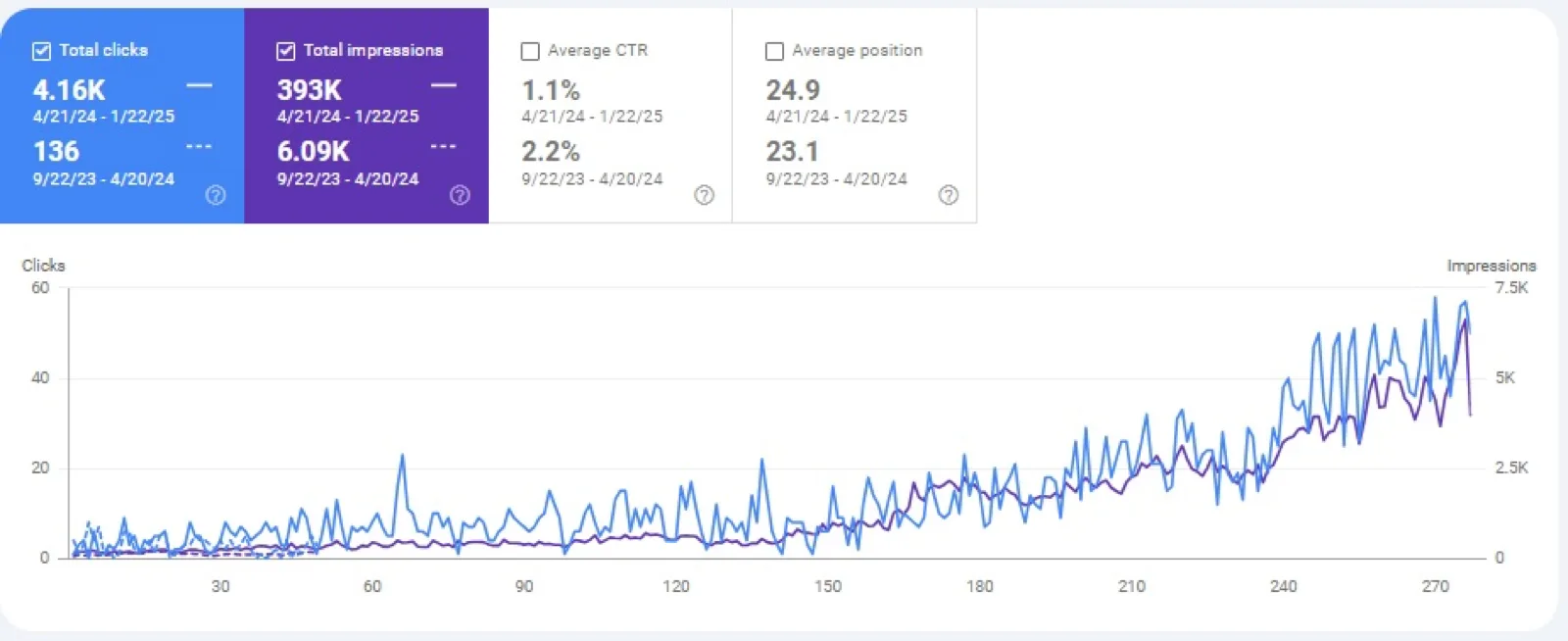
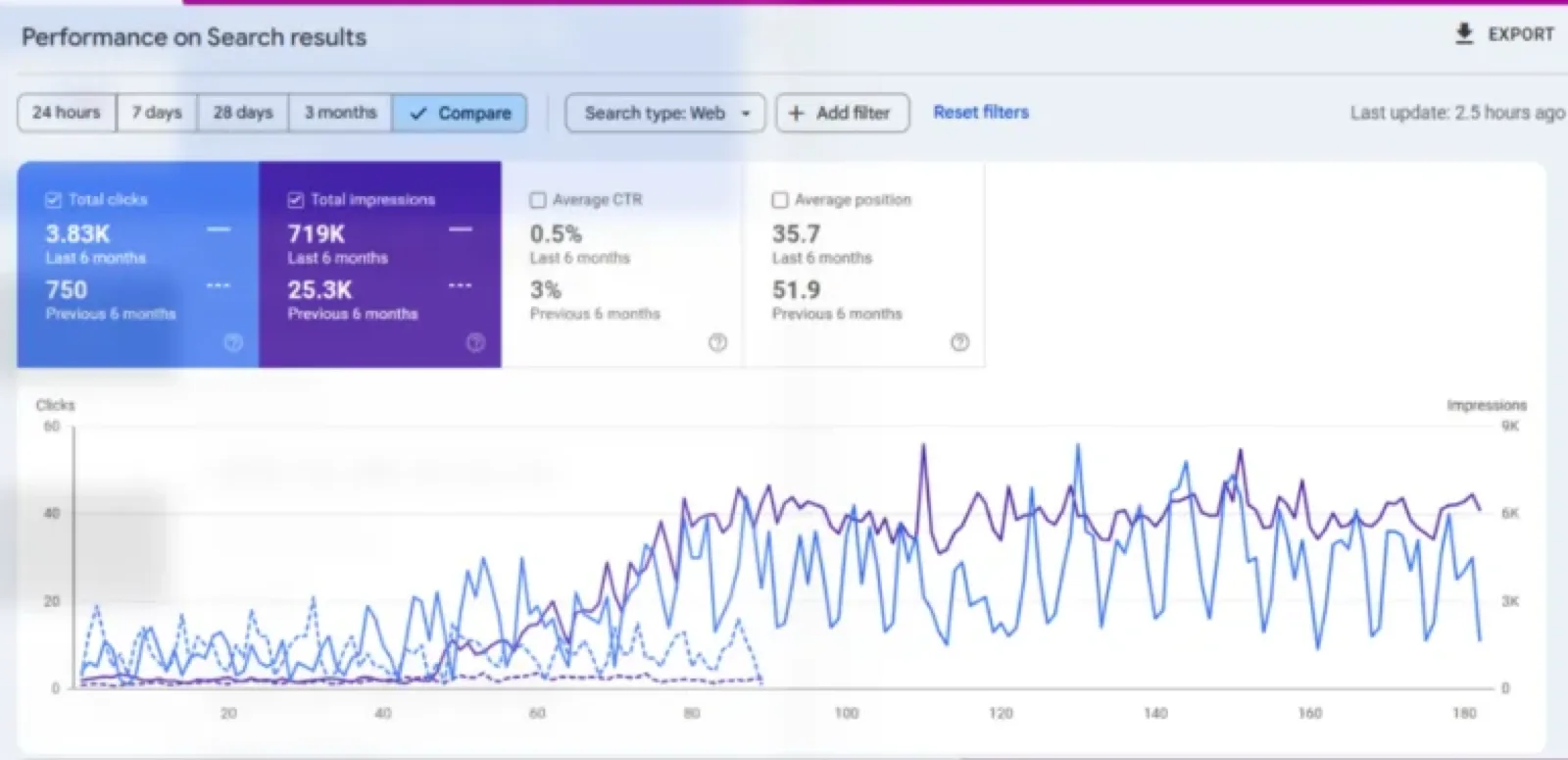
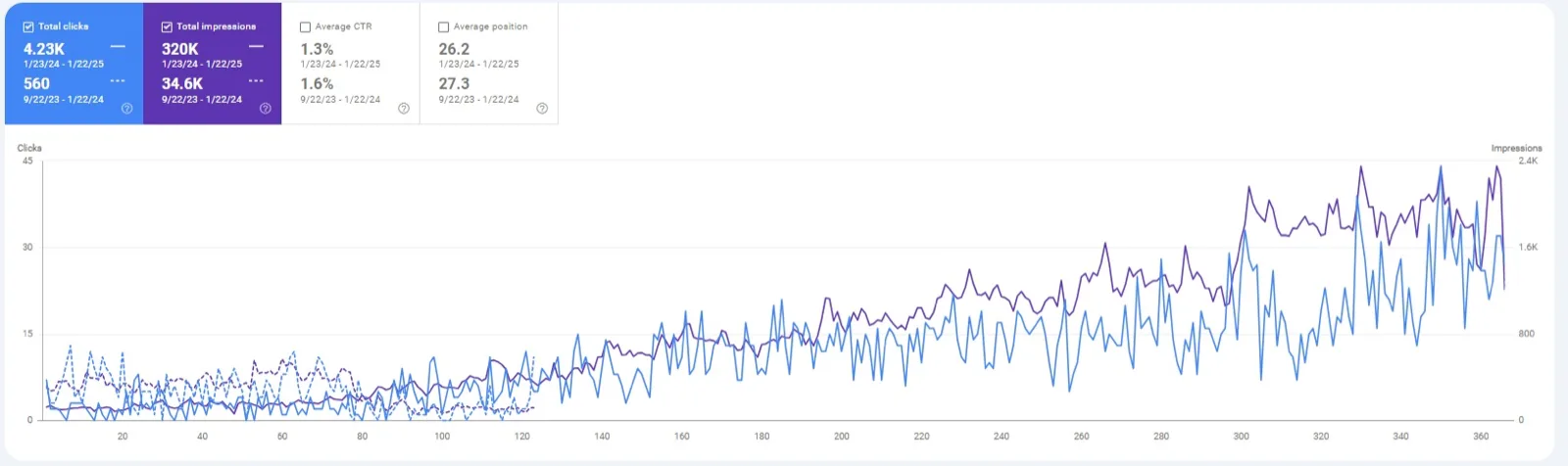
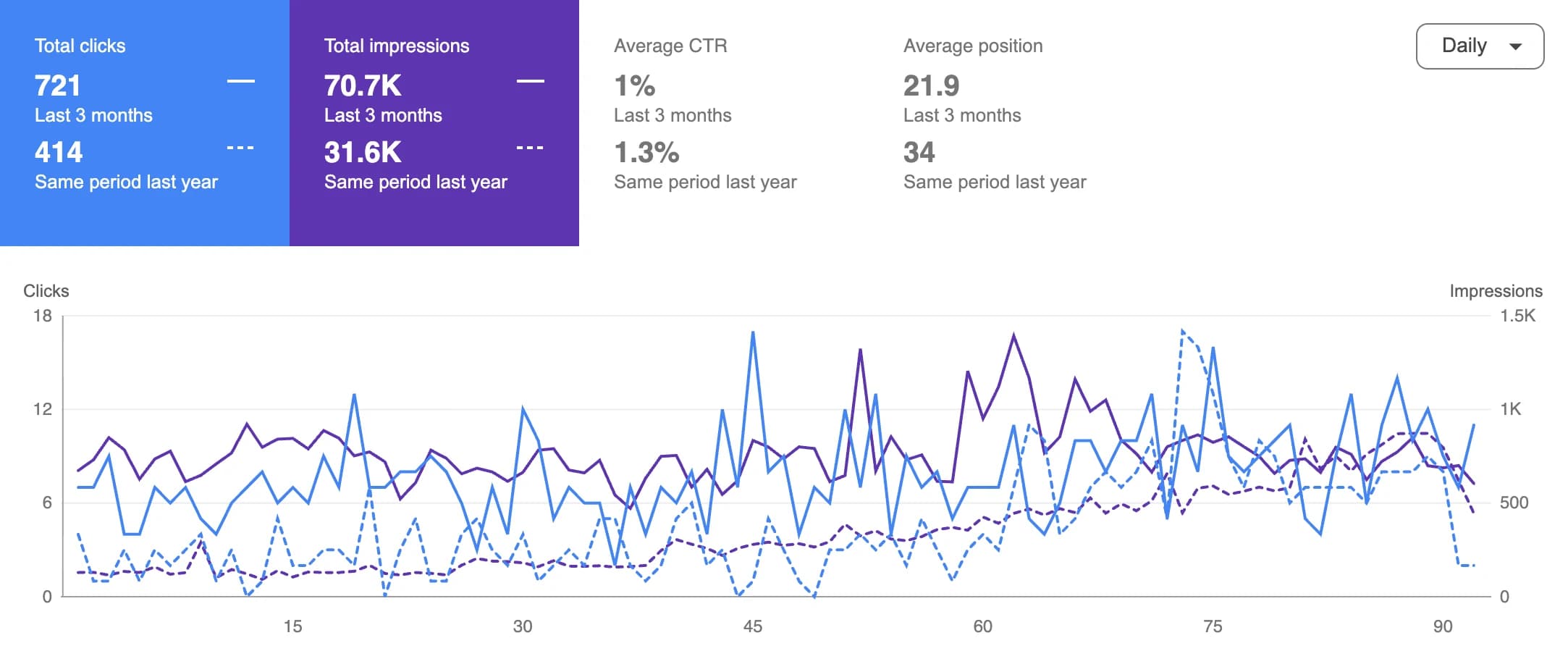
Google Search Console performance panels from client accounts — Google's own screen, not a report we wrote. Organic search only, cropped so no brand or domain is identifiable, each labelled with the exact window it covers.
Be the brand AI recommends.
Digidot.io, our AI optimisation (AIO) platform, shows what ChatGPT, Claude, Google AI, Gemini and Perplexity say when buyers in the UAE ask about your market. Track it yourself on the platform, or let our Dubai team fix it for you.
- ChatGPT
- Claude
- Google AI
- Gemini
- Perplexity
Illustration: how often each AI names your brand in its answer